
A lot of new customers and designers, you’ve probably heard this phrase: “This image looks clear on the phone, but it’s not suitable for printing?”
Today, I’ll explain in a lighthearted way why an image can look clear but still can’t be printed.
01 Clear on Phone ≠ Can Be Printed

Let’s start with a harsh reality: Most images you see on your phone are “compressed versions.” To save bandwidth and facilitate transmission, platforms compress the original image multiple times. You don’t notice the blurriness because the screen is small and close, which acts like a built-in “beauty filter.”
But printing is different: Printing requires the image to be spread out on paper, revealing every tiny pixel in its true form.
The professional requirement is: zoom in, and keep zooming until you see jagged edges, blurriness, and noise, leading to the conclusion: this image just won’t work.
Therefore, “looks great on the phone” and “looks great when printed” are entirely different matters.
02 Bitmap vs. Vector: Which is More Suitable for Printing?
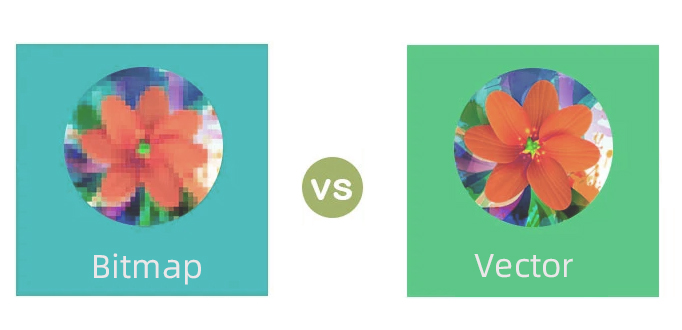
Let’s break it down simply into two categories:
Bitmap (Raster Images): Photos, screenshots, and saved JPGs or PNGs are made up of individual pixels. When enlarged to a certain extent, you’ll see small square blocks, which is what is commonly referred to as “mosaic.”
Vector Images: Logos, icons, and line illustrations created using AI or CDR are calculated using mathematical formulas, remaining sharp even when enlarged to two or three meters. Common formats include AI, EPS, CDR, and SVG.
Here’s a translation: “If the logo is just a small JPG, enlarging it for printing on a cosmetics box will definitely result in blurriness. If you can provide the vector source file, we can print it at any size without issues.”
03 Resolution Matters
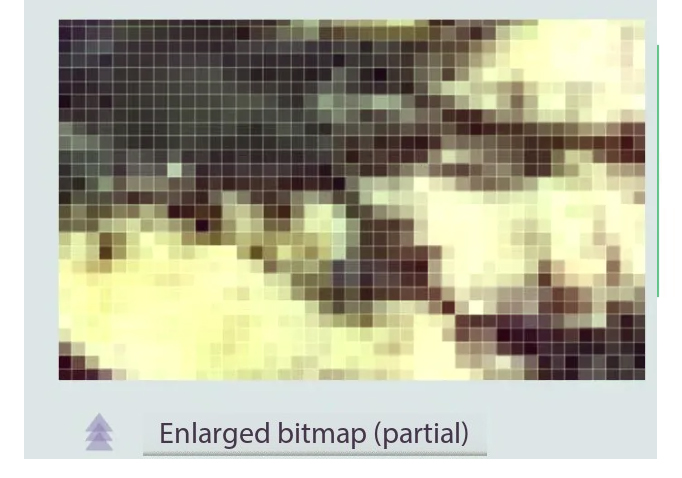
What’s this 300dpi that’s frequently mentioned in the printing industry? DPI can be understood as “how many pixels per inch.”
- 72dpi is the standard for “just for viewing on screens.”
- 300dpi is the basic requirement for printing.
On a computer, an image at 72dpi and one at 300dpi may appear nearly identical; however, when printed, the 72dpi image will reveal a grainy texture.
What’s worse is that some images:
- Don’t have enough pixels to begin with (the image is too small)
- Are forcibly enlarged to the required size
- Due to insufficient resolution, the final outcome will be that what you believed was a high-definition photo is actually just a low-quality enlargement.
So it’s not that the designer doesn’t want to help you enlarge it; it’s just that the image itself doesn’t have enough pixels. A large image needs to be ‘real,’ not artificially inflated by software.
04 Practical Tips: How to Politely Decline an Image That Can’t Be Printed
Next time when you have a logo or picture looks really clear on your phone, but unfortunately, it won’t work for printing. We can explain this to our clients :
Printing needs a resolution of 300dpi, and we have to make sure the pixel size is big enough for the actual printing. Otherwise, it’s going to turn out blurry, especially with text and logos.
Here we can offer a couple of options:
- Use a larger size original image
- Provide the logo in vector format.
If you have any other questions or printing needs, please contact us.